Help: Fund Portfolio Comparison
The Fund Portfolio Comparison tool allows you to compare the investment activity of any two funds across years, sectors, and investment vehicles. This helps you understand a fund's investment strategy, sectoral preferences, and how it compares to other funds.
How to Use the Fund Comparison Tool
1. Select Funds to Compare
Use the two dropdowns labeled Fund A and Fund B to select the funds you want to compare. The swap button (↔) between them lets you quickly exchange the selected funds.
Once both funds are selected, the comparison matrix will automatically load showing their portfolio companies across years and sectors.
2. Filter the Comparison
Click "Add Filters" to expand the filter panel where you can refine the comparison:
Applies to Both Funds:
- Sectors: Filter by specific sectors to see how each fund invests in a particular industry.
- Years: Filter by investment year to see recent activity or historical trends.
Applies to One Fund:
- Investment Vehicles: Each fund has its own dropdown showing the distinct investment vehicles (e.g., "Fund I", "Fund II", "Fund III") used by that fund.
- Select one or more vehicles to see only portfolio companies invested through those specific vehicles.
- If a fund has vehicle data marked as "n.a.", the dropdown will be disabled with an explanation.
- For companies where multiple vehicles invested (e.g., "Fund II, Fund III"), each vehicle appears as a separate option and selecting either will include that company.
Use the "Clear All Filters" button to reset all filters at once.
3. Understanding the Matrix
The matrix displays portfolio companies organized by Sector (rows) and Investment Year (columns).
Company Badge Colors:
- Blue badge — Company invested only by Fund A
- Green badge — Company invested only by Fund B
- ★ Purple badge — Company invested by both funds in the same year
- # Blue badge — Company invested by Fund A and Fund B but in different years
- # Green badge — Company invested by Fund B and Fund A but in different years
4. Download PDF
Use the "Download PDF" button to export the comparison matrix as a PDF. The PDF includes:
- Fund details (type, geography, stages, ticket sizes)
- Portfolio company counts and common companies
- The full comparison matrix
- Active filters applied (Sectors, Years, Vehicle filters) — shown in the summary stats section
Illustration
Let's understand this feature using an example — here is the Fund Comparison page for Kedaara Capital vs ChrysCapital
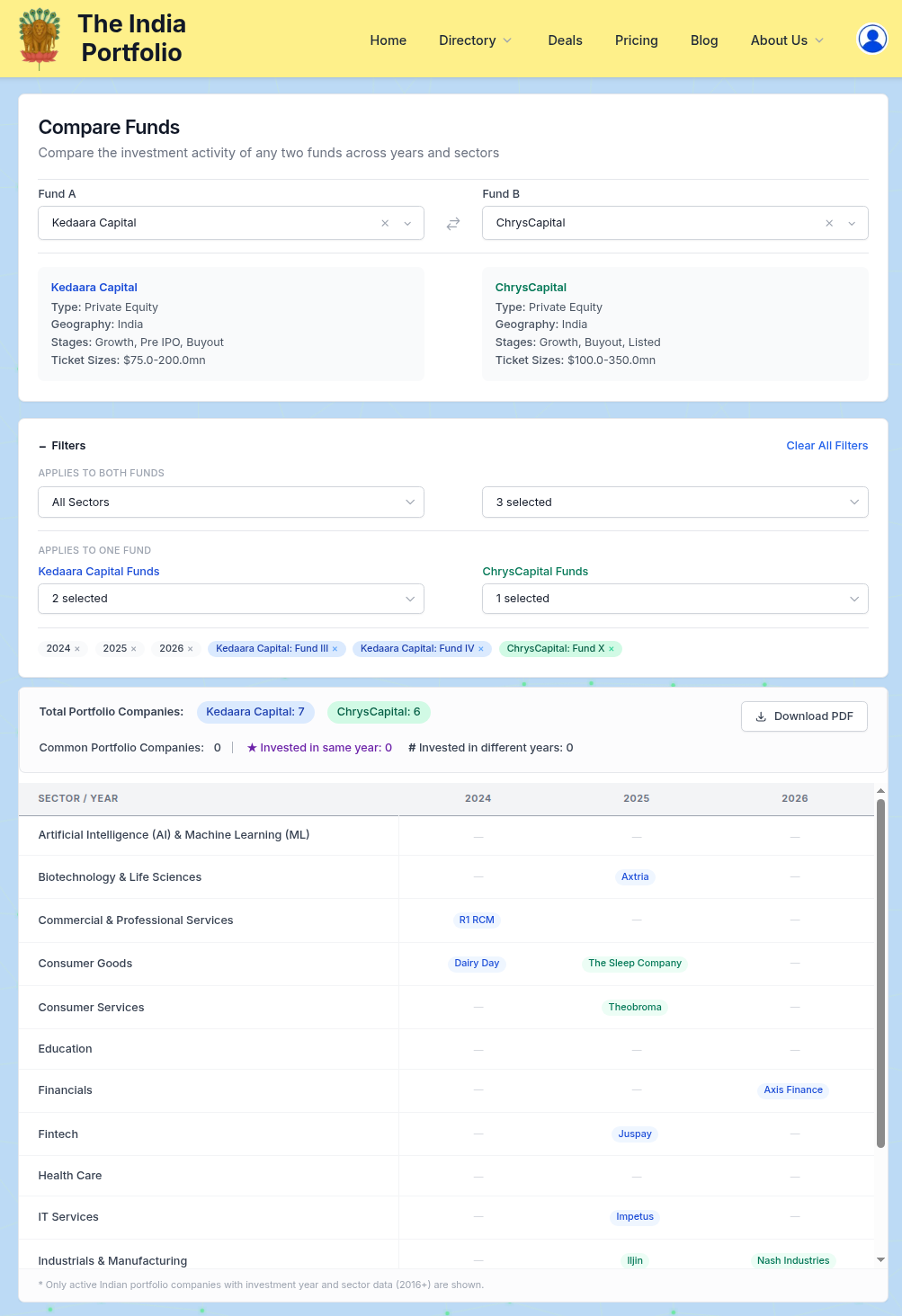
As shown in the example, you can see the portfolio companies of both funds organized by sector and year. The summary stats at the top show:
- Total Portfolio Companies: Count of active Indian portfolio companies for each fund
- Common Portfolio Companies: Companies that both funds have invested in
- ★ Invested in same year: Common companies where both funds invested in the same year
- # Invested in different years: Common companies where the funds invested in different years
Advanced Features
Investment Vehicle Filter
The investment vehicle filter allows you to analyze how each fund's different vehicles (e.g., "Fund I", "Fund II") invest across sectors and years:
- Each fund's vehicle dropdown shows all distinct vehicles used by that fund
- Select one or more vehicles to filter the portfolio companies for that specific fund
- For example, selecting "Fund III, Fund IV" for Kedaara Capital will show companies invested through Kedaara's Fund III & IV
- This is useful for understanding the evolution of a fund's investment strategy across different vehicles
Cell Expansion
Cells in the matrix show up to 5 company names initially. If a cell contains more than 5 companies, click the "+ X more" button to expand and see all companies in that cell.
Points to Note & Limitations
- Only active portfolio companies are shown (exited companies are excluded).
- Only Indian portfolio companies are included.
- Only companies with investment year 2016 or later are displayed to avoid visual sprawl.
- Investment vehicle data availability depends on the source data — some funds may have all vehicles marked as "n.a." (non-actual).
- When a company has multiple vehicles invested (e.g., "Fund II, Fund III"), selecting either vehicle will include that company in the filtered view.
- Given the dependence on funds' websites and news for sourcing portfolio company data, any limitations or inaccuracies in the source might flow through into the data on this page.
💡 Tip: Try filtering by investment vehicle to see how each fund's different vehicles invest in specific sectors!
If you have further questions about this feature, please contact us